


Close Menu
GamesHorizonGamesHorizon
  • News
  • Guides
  • Reviews
  • Features
  • Platforms
    • PC
    • PS5
    • Xbox Series S
    • Nintendo
    • PS4
    • Xbox One
  • Anime
  • Game Hubs

Subscribe to our Newsletter

Get the latest gaming news, guides and reviews from GamesHorizon to your INBOX!

WHAT'S HOT
Seven Deadly Sins Origin Dark Abyss Flare Feature Image

The Seven Deadly Sins Origin – How to capture the Dark Abyss Flare (Nightmare Fury)

June 26, 2026
Seven Deadly Sins Origin icy Frosty Bear View on Menu

How to Capture Icy Frost Bear in The Seven Deadly Sins Origin

June 26, 2026
Black Ops 7 Zombies Kowakujō Headphone Feature Image

BO7 Zombies Kowakujō All 3 Headphone Locations

June 26, 2026
Facebook X (Twitter) Instagram Pinterest
  • Starfield
  • REPLACED
  • Alabaster Dawn
  • Outbound
  • The Adventures of Elliot
GamesHorizonGamesHorizon
  • News
    Aceles or Mircobe in Starfield

    Starfield’s performance on PS5 leads to players demanding refunds

    April 13, 2026
    A Rockband poster with someone playing a guitar in front of others playing instruments

    Rock Band 4 Is Getting Delisted This Month

    October 1, 2025
    Xbox Series X and Series S placed together on a table.

    Microsoft’s Website Crashes as Gamers Boycott Xbox Pay Everywhere Over 50% Price Hike

    October 1, 2025
    Ubisoft’s New ‘Vantage Studios’ Gives Its Franchises to the Guy Whose Last Gig Was an Anime Avatar AI/NFT Startup - - News | change appearance in Destiny Rising | GamesHorizon

    Ubisoft’s New ‘Vantage Studios’ Gives Its Franchises to the Guy Whose Last Gig Was an Anime Avatar AI/NFT Startup

    October 1, 2025
    Fortnite Peacemaker doing a nazi symbol

    Fortnite Removed an Emote for Racist Origins

    September 29, 2025
  • Guides
    Seven Deadly Sins Origin Dark Abyss Flare Feature Image

    The Seven Deadly Sins Origin – How to capture the Dark Abyss Flare (Nightmare Fury)

    June 26, 2026
    Seven Deadly Sins Origin icy Frosty Bear View on Menu

    How to Capture Icy Frost Bear in The Seven Deadly Sins Origin

    June 26, 2026
    Black Ops 7 Zombies Kowakujō Headphone Feature Image

    BO7 Zombies Kowakujō All 3 Headphone Locations

    June 26, 2026
    RuneScape Dragon WIlds Obsidian Cape Menu Feature Image

    RuneScape Dragon Wilds – How to get the Obsidian Cape

    June 25, 2026
    RuneScape Dragon Wilds Magic Carpet Screen Feature Image

    RuneScape Dragon Wilds: How to Unlock Carpet Mount

    June 25, 2026
  • Reviews
  • Features
    Starfield Feature Image

    Everything Added to Starfield since Launch

    April 7, 2026
    An overview of the scenery in Dying Light The Beast

    Where Does Dying Light The Beast Take Place?

    September 15, 2025
    First-person combat showcased in Borderlands 4, highlighting its vibrant weapon designs and firefights.

    Borderlands 4 Needs to Have These Features From Borderlands 3

    September 10, 2025
    A screenshot from the games Ender Lilies: Quietus of the Knights, Bō: Path of the Teal Lotus, and Hollow Knight

    Best Games Like Hollow Knight Silksong

    September 9, 2025
    Remi disguised as a townsperson and standing in the woods

    Hell Is Us First Impressions

    August 25, 2025
  • Platforms
    • PC
    • PS5
    • Xbox Series S
    • Nintendo
    • PS4
    • Xbox One
  • Anime
    Smiling Statue In Solo Leveling, Explained and Answered

    Solo Leveling Statue Smile Explained: The Cruel Creator, System Blueprints, and Season 3 Secrets

    May 26, 2026
    All About Baruka In Solo Leveling

    All About Baruka In Solo Leveling

    March 21, 2024
    9 Strongest Mashle Characters, Ranked

    9 Strongest Mashle Characters, Ranked

    March 21, 2024
    Mashle Season 2 Episode 11 Release Date Details

    Mashle Season 2 Episode 11 Release Date, Time, And Where To Watch

    March 20, 2024
    Solo Leveling Episode 11 Expectations

    Solo Leveling Episode 11: Release Date, Time, And Where To Watch

    March 20, 2024
  • Game Hubs
GamesHorizonGamesHorizon
Home»Guides
Characters from Destiny: Rising shooting at the right side of the screen
NetEase Games

How to change appearance in Destiny Rising

RishiBy Rishi3 Mins Read Guides August 30, 2025
SHARE
Facebook Twitter Reddit WhatsApp Telegram Tumblr

The first thing many players notice when starting Destiny: Rising is the character creator. You step into the game as Wolf, and before the prologue fully unfolds, you’re asked to shape what your version of Wolf looks and sounds like. The options feel exciting at first, different body types, voices, hairstyles, and skin tones, but the catch is once you confirm that choice, you don’t get another chance.

That single moment sets the tone for your entire playthrough, which is why so many players look up how to change appearance in Destiny Rising afterward. The good news is there are ways to keep Wolf looking fresh, and while they don’t follow the usual reroll system you might expect, the game still gives you options to refine your look later on.

Destiny Rising: How to change appearance
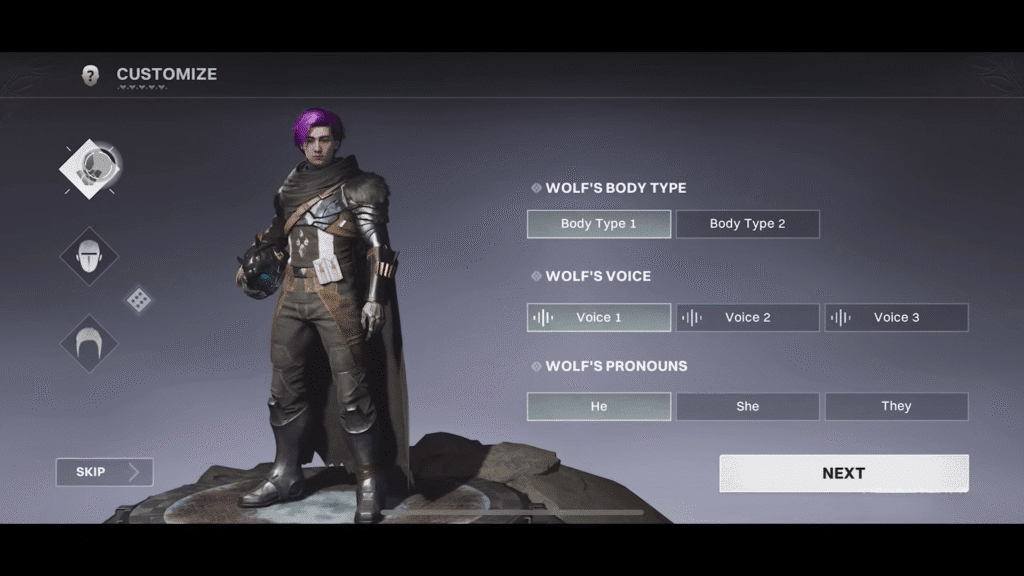
changing Wolf's appearance in Destiny Rising
NetEase Games

During the prologue, Wolf’s core look is locked in. You’ll pick their body type, voice, skin tone, hairstyle, and name. To make the changes in the appearance of the character later:

  • Open the Characters menu
  • Select Wolf, then head to the Appearance tab
  • From here, browse skins, ornaments, decals, or emotes on the right-hand side

Destiny: Rising even allows cosmetic loadouts. If you’ve pieced together a look you really like, you can save it in the Loadout tab. This makes it easy to switch back and forth depending on your mood or the event you’re running.

Skins are where most of the customization happens after the prologue. You can pick up character skins, Ghost shells, weapon ornaments, Sparrow ornaments, transmat effects, and even emotes. Some of these cost Silver in the in-game store, while others can be earned with Bright Dust or unlocked for free through pulls.

What are the customization choices in Destiny: Rising

Customization in Destiny: Rising goes far beyond simple gear swaps. Every choice you make, from weapon mods to armor perks, directly affects how your Guardian performs in different encounters. Here are the types available in the game:

  • Body Type: Choose masculine or feminine right at the beginning. This part is only editable before the prologue finishes.
  • Voice: Three voice options are available – masculine, feminine, and gender-neutral. Again, locked once chosen.
  • Skin & Face: Preset-based customization, each with a few variations in tone. No deep sliders, so make sure you’re happy with the preset you pick.
  • Hairstyle & Color: Six hairstyles at launch, with twelve color choices. More could be added later through updates or cosmetics.
  • Name: Wolf is the default, but you can give your character an original name that becomes your in-game identity.

Character ornaments in Destiny: Rising
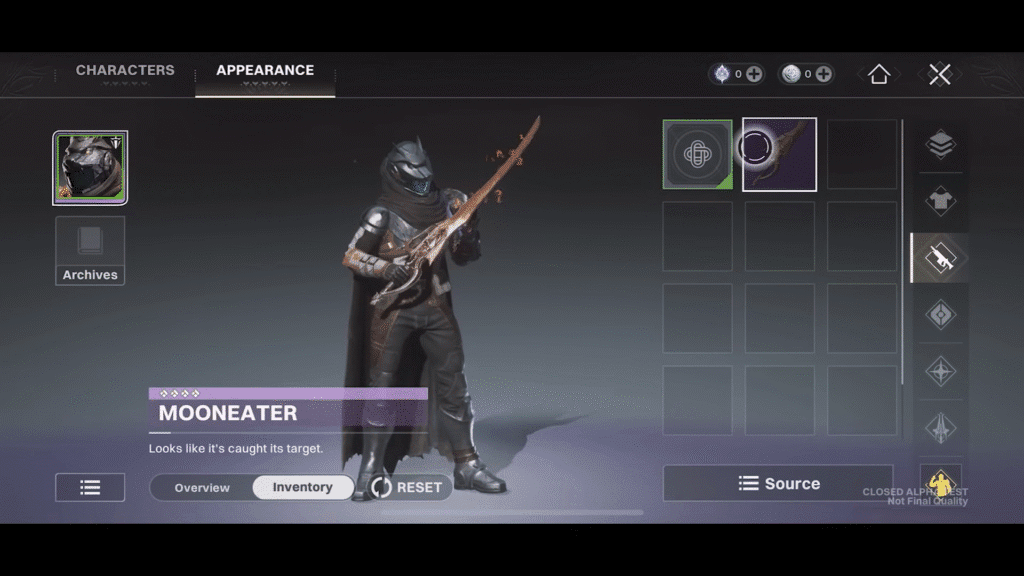
Still from character changing screen in change appearance in Destiny Rising
NetEase Games

Wolf’s look doesn’t end with base features. Character ornaments allow for complete outfit swaps, and three are available at launch. For Ghosts, the floating companions, you can collect up to 12 different shells. Sparrows, your ride through the world, also have 14 unique ornaments.

Even weapons can get their own makeovers with Relic Ornaments, changing the style without affecting combat performance. Then there are decals, graffiti-like add-ons that give Wolf a bit more personality. These come from decal packs tied to the gacha system.

It’s not a game-changer for stats, but it adds flair if you’re chasing fashion. The same attention to detail applies to Controller Support too, letting players easily navigate customization menus and swap between ornaments or decals without hassle in Destiny: Rising.

Destiny: Rising
Share. Facebook Twitter Reddit WhatsApp
Rishi

LATEST POSTS

Seven Deadly Sins Origin Dark Abyss Flare Feature Image

The Seven Deadly Sins Origin – How to capture the Dark Abyss Flare (Nightmare Fury)

Seven Deadly Sins Origin icy Frosty Bear View on Menu

How to Capture Icy Frost Bear in The Seven Deadly Sins Origin

Black Ops 7 Zombies Kowakujō Headphone Feature Image

BO7 Zombies Kowakujō All 3 Headphone Locations

RuneScape Dragon WIlds Obsidian Cape Menu Feature Image

RuneScape Dragon Wilds – How to get the Obsidian Cape

RuneScape Dragon Wilds Magic Carpet Screen Feature Image

RuneScape Dragon Wilds: How to Unlock Carpet Mount

RuneScape Dragon Wilds Feature Image

RuneScape Dragon Wilds: How to start & complete Contact Quest

RuneScape Dragon Wilds Infinity Robe Set Feature Image

RuneScape Dragon Wilds: How To Craft the Infinity Robe Set

Deltarune Chapter 5 Fox Collectibles Feature Image

Deltarune Chapter 5 – All 5 Fox Locations

Deltarune Chapter 5 Secret Egg Room

How to find the Secret Egg in Deltarune Chapter 5

Half Sword Patch Update Feature Image

Half Sword – All Changes in Patch 0.6.1

FOLLOW US
  • Facebook
  • Twitter
  • Instagram
  • Pinterest

Subscribe to our Newsletter

Get the latest gaming news, guides and reviews from GamesHorizon to your INBOX!

MOST READ
15 Best Game Trilogies Of All Time, Ranked - - News | change appearance in Destiny Rising | GamesHorizon
15 Best Game Trilogies Of All Time, Ranked
RPG genre
The Best RPGs Of All Time – Updated For 2025
30 Best PS5 Games To Play In 2025 - - News | change appearance in Destiny Rising | GamesHorizon
30 Best PS5 Games To Play In 2025
40 Best PS4 Games You Shouldn't Miss (Ranked) - - News | change appearance in Destiny Rising | GamesHorizon
40 Best PS4 Games You Shouldn’t Miss (Ranked)
All rights reserved. Copyright © 2023 GamesHorizon.
  • About Us
  • Editorial Standards
  • Privacy Policy
  • Terms and Conditions
  • Contact Us

Type above and press Enter to search. Press Esc to cancel.

GamesHorizon
Powered by  GDPR Cookie Compliance
Privacy Overview

This website uses cookies so that we can provide you with the best user experience possible. Cookie information is stored in your browser and performs functions such as recognising you when you return to our website and helping our team to understand which sections of the website you find most interesting and useful.

Strictly Necessary Cookies

Strictly Necessary Cookie should be enabled at all times so that we can save your preferences for cookie settings.

Analytics

This website uses Google Analytics to collect anonymous information such as the number of visitors to the site, and the most popular pages.

Keeping this cookie enabled helps us to improve our website.