




We all had those moments of not being satisfied with the appearance of our character or vehicle halfway through the game, even after spending countless hours making it at the beginning. If you are facing the same issue, not being satisfied with the colors of the van in Outbound, the good news is that you can make changes to the color by tweaking it at the station.
The game allows you to make changes to the color of your van as many times as you want, but as long as you have the correct amount of items required to make the color change. Here is a complete guide to make a color change to your van in Outbound.
How to Change the Color of the Van
The very first item we will need to make any change to the color of the van is Paint. It’s another resource material that we need to have a good amount of before moving to the next process for painting.
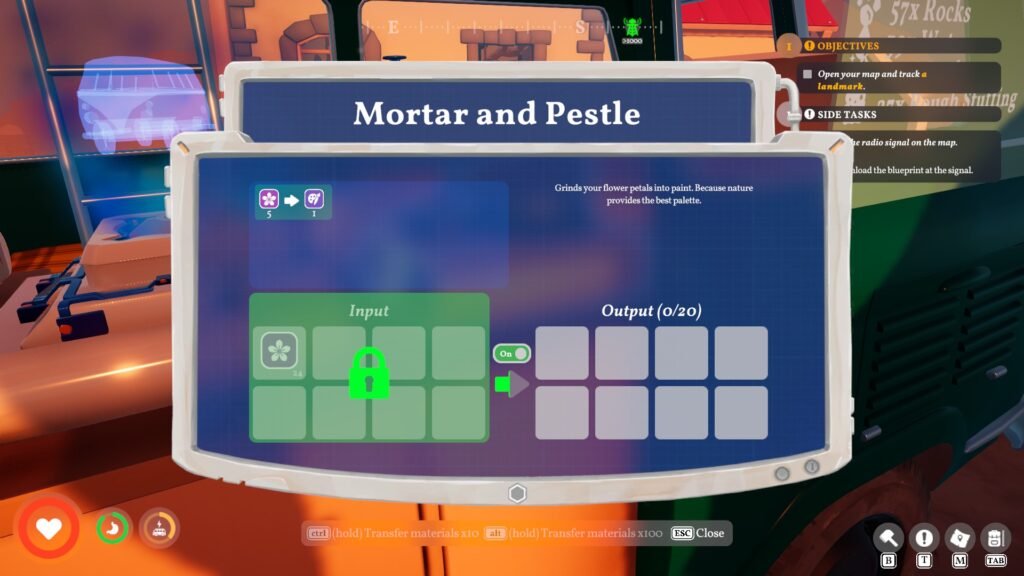
The only way to get Paint (Resource Material) is by crafting it out in the game; the machine for this job will be a Mortar and Pestle. I found the blueprint for Mortar and Pestle in the middle of the desert biome, right inside the Windmill outpost, but you might get the blueprint somewhere else, so always be on the lookout for the towers to recover the blueprints. Once unlocked, you can build the Mortar and Pestle machine on a container for just x2 Rocks.
Using Mortar and Pestle
So what does Mortar and Pestle do in Outbound? Their job is to turn flowers into Paint. You will find plenty of flowers around The Windmill in the desert biome. While the area will be filled with all colors of flowers, you are only allowed to pick Tulips, purple-colored flowers. You will also find sacks of Tulips inside the Windmill in the desert location.
Once you pick enough Tulips around the area, head back to the Mortar and Pestle machine in the van, invest all the Tulips, and convert all of them into Paint.
Note: It requires x5 Tulips to make x1 Paint. So always collect a handful before grinding them to paint.
Now we have the essential item, Paint, but we can’t use it directly to change the color of the Van. For this task, we will need to get to the Painting Station. I found a Painting Station at the south of the Desert Biome in the first area. Head over to the station, park your van, and interact with the terminal to change the color. After finalizing the color for the van, you will be asked to offer Paint as a currency to make the changes.
Note: You can certainly make changes to the color of the van at any time via Painting Station, but to apply, you will need the Paint item or resources.
You can make changes to the color of the van as many times as possible, but you will run out of paint. There are Tulips around the map, but the scarcity of these flowers makes the color changing of the van a bit limited. If you are having trouble fueling the energy in your van, check out all the beginner-friendly ways to recharge the van in Outbound.
