




Nobody ever said running a business would be easy, especially if you are dipping your toes into the restaurant industry. Things are always hectic 24×7; demanding customers, unsatisfied staff, and running out of ingredients are going to be a daily occurrence. In Nivalis Nights, when you are running a restaurant, you have to do more than just put food on the plate to increase the restaurant’s reviews.
The system here is complex; complying with the mechanics will reward you with a happy staff and customers leaving nothing but positive reviews for the restaurant. This guide is about discovering all the helpful ways to increase your review rating in Nivalis Nights.
Best Ways To Increase Review Rating in Nivalis Nights
Selecting the proper recipe, catering to the local demographic, choosing high exclusivity-rated dishes, maintaining the staff, and setting up comfortable furniture are the best ways to get a high review rating for the restaurant. Press the “Tab” key to show all in-game features, then navigate to the option all the way to the right to see the Restaurants. Here, you will get the option for:
- Overview: It shows the stats for review score, venue information, staff, and financial details.
- Inventory: Shows the current ingredients in stock.
- Menu: You will see the list of current recipes served in the restaurant.
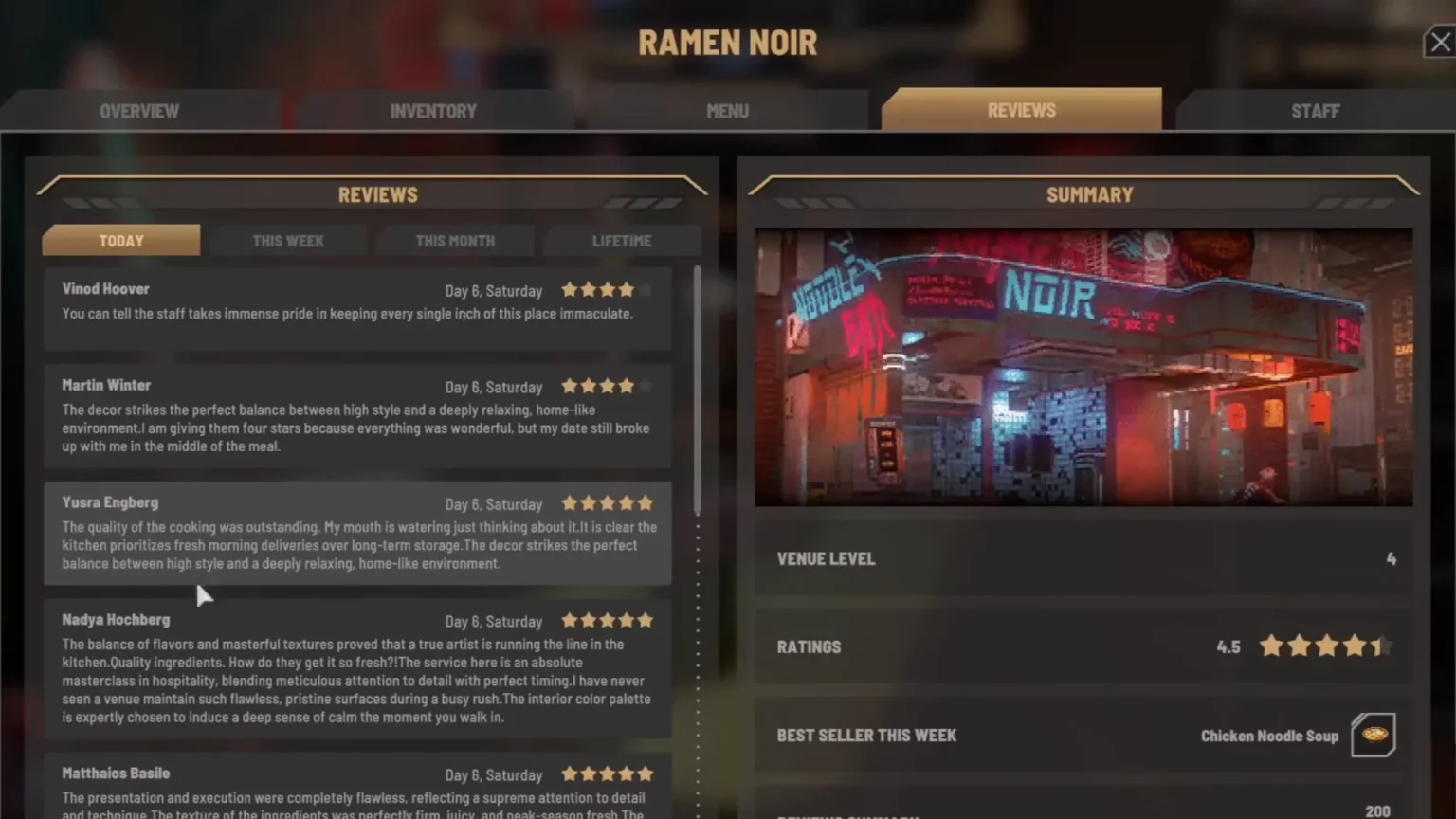
- Review: Here you will be taking a look at the reviews left by the customers. Some of them will share ideas to help you make your restaurant better.
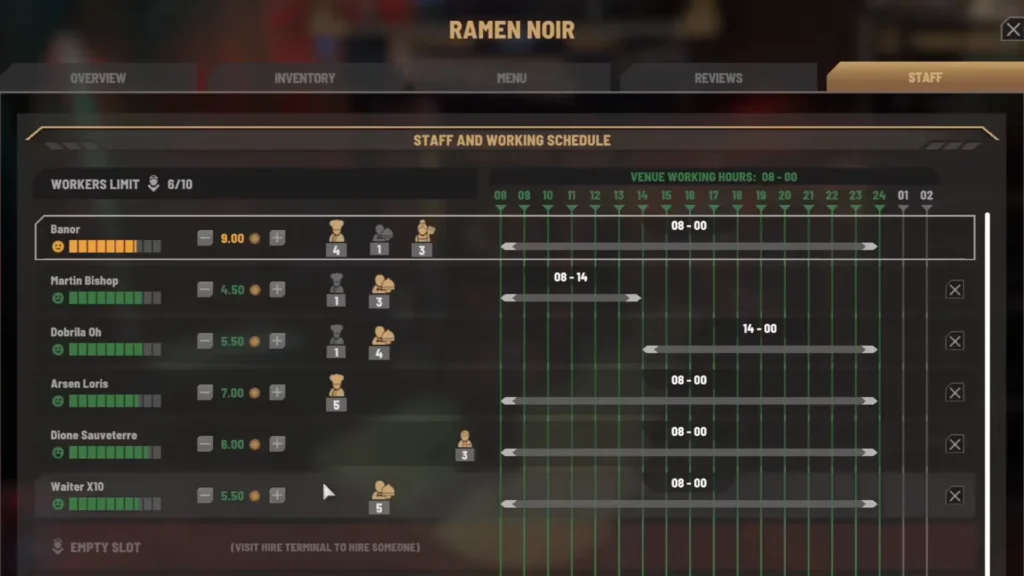
- Staff: Shows all the staff information, including their names, working hours, favorable stats, and happiness indicators.
All 5 of these stats will help you in running a restaurant; nearly everything you need to know about the success or failure of the restaurant can be observed from all five stats mentioned above.
Selecting the Proper Food
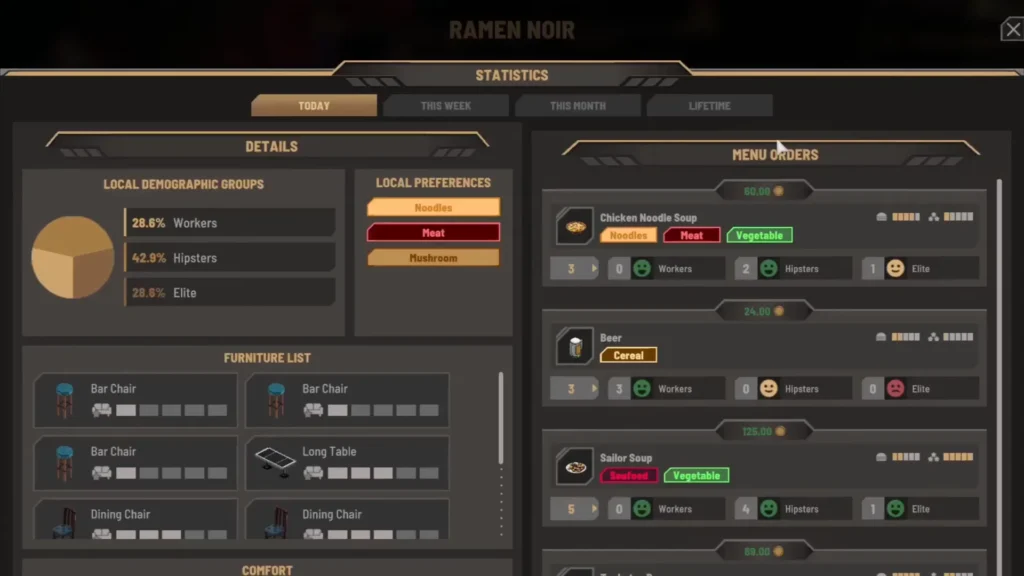
Go to the Menu tab, and right at the top, you will find whether people are happy with the menu or not. Think of this as an overall review for the restaurant. If people are not happy, then you need to make some big changes quickly. On the Menu screen, click on Statistics; this will show you the local preferences and Local demographic groups, Menu Orders, Furniture List, and more. Each district will have its own group of preferences, and it’s your job to cater to the people to make them happy.
Understanding the Local Demographic and Local Preferences
Take a look at the Local Demographic Group to see the type of customers the restaurant receives; it will be divided into Hipsters, Elite, and Workers. The demographic will have a huge influence on the Menu Orders for the restaurant. Some recipes will be a huge hit amongst one demographic and underwhelming for the other. For example, Beer will be a more preferred form of beverage for the Workers demographic but will not appeal to the Elite customers.
Note: The image and the stats details here are from the Ramen Noir restaurant.
Now take a look at the food item shown under the Local Preferences. Every district will have its own selective foods; think of the Local Preferences as a tab to view the favorite food for the district. If the item list under Local Preferences includes: Noodles, Meat, and Mushrooms. You must choose recipes that either combine all three ingredients or have at least one in a recipe to please the people in the district. For example, the Chicken Noodle Soup is made from Meat, Noodles, and Vegetables, so you are crossing two ingredients off the list.
Choosing the Correct Recipes
In the Menu Order section in Statistics, you will see the recipe’s appeal to the local demographic, categorized by smiley emojis. Each emoji expression shows the likeness of the recipe to the customers, whether Elite, Hipster, or Workers.
- Green Smile Emoji- Very Likeable
- Yellow Happy smile emoji- Likeable
- Red frown Emoji- Disappointed.
Some recipes will appeal to Workers but disappoint Elite and Hipsters. The game will show this information by putting a green smile emoji on Workers and a red frown emoji on Elite and Hipsters. Here you are pleasing one demographic of people and abandoning the other two. If you want to get your rating up, you must focus on a recipe that pleases all the demographic classes for the restaurant in the district.
Each dish has an Exclusivity Rating shown on the right, as marked on the image. If a recipe pleases all three demographics, then the rating on the exclusivity meter will be high. If a recipe shows a green smiley emoji on Workers, Hipster, and Elite, then you can count the dish as a people pleaser, as the Exclusivity Rating will be at 6/6 bars. The rating will get lowered if a recipe pleases only one demographic. The best way to increase the rating here is by picking up dishes with a high exclusivity rating. Look for recipes that please all the Local Demographic Groups instead of favoring only one.
Also Read: What to do with Rotten Food in Nivalis Nights
Other Ways to Increase Review Ratings
Setting up Proper Furniture
On the Statistics page, you can also view all furniture details in the restaurants. Each piece of furniture will have 6 boxes underneath; these boxes indicate the comfort meter. Buying a common chair will have a comfort rating of one or two, which will create more disappointment for the customers. Switching to a high-end chair with a high comfort rating is preferable to keep the customer happy.
Hire Better Workers
Hire better workers and assign them to proper positions. Each staff member will have their own stats; some of them are going to be good at cooking, while others are not so much. If a staff member has level 1 in Cooking, assigning that staff member in charge of the kitchen will always lead to disappointing food. Hire better staff with higher stat numbers in cooking or cleaning, or other stats to get more out of them.
Tip: Making the staff work past their working hours will impact their happiness meter, which can be seen under each staff member in the Staff menu.
Clean
Since you are running a restaurant, sooner or later, you will see piles of trash around your restaurant. You can either clean it manually or assign any of your staff to cleaning duty to take care of the mess. Some workers will have a better cleaning stat, so assigning them is also going to help you clean the restaurant without your manual input.
Stock Up!
Always make sure the fridge is fully stocked with ingredients. Hiring a manager will take care of this part of the restaurant’s daily work. If a customer orders an item and you are out of ingredients, then you will get a notification: “Customer couldn’t order anything from the menu. Check your ingredients!” You can easily guess how this small notification window will have an impact on the restaurant’s review, so always fill up on stock to get fewer disappointed customers.
When you are picking recipes for the restaurant, try to pick the recipes that share the same ingredients; this might not seem like much, but it will save you plenty of money. When the manager goes out to buy the ingredients, instead of buying a variety of them, they will buy the ingredients that go toward most of the recipes in the restaurant.
Setting up Proper Pricing
When you level up, you can set a dish price multiplier, which raises the dish’s price in the restaurant. Don’t add too much of a bigger number to the dishes; keep the cost neutral. I advise focusing on customer happiness with the recipe rather than gearing toward profit.
Get Tablet Menu
It allows customers to order from the menu on the table, cutting the workload for the waiters. Freeing up the time for the waiters, so they will spend less time walking to take the orders. You can get one for $160 from the Hardware Vendor in the back of the Meridian Market furniture shop. The tablet also boosts the review rating, so don’t ignore it.
