
Close Menu
GamesHorizonGamesHorizon
  • News
  • Guides
  • Reviews
  • Features
  • Platforms
    • PC
    • PS5
    • Xbox Series S
    • Nintendo
    • PS4
    • Xbox One
  • Anime
  • Game Hubs

Subscribe to our Newsletter

Get the latest gaming news, guides and reviews from GamesHorizon to your INBOX!

WHAT'S HOT
Gothic 1 Ancient Ore Armor and Improved Ore Armor Feature Image

Gothic 1 Remake- How to Get Improved Ore Armor

June 18, 2026
Gothic 1 Remake Gomez Room Chests Ancient Ore Armor

Gothic 1 Remake – How to get Ancient Ore Armor

June 18, 2026
Gothic 1 Remake A Letter form Mage Quest Featuer Image

Gothic 1 Remake – Give Letter to Torrez or Milton Choice Guide

June 18, 2026
Facebook X (Twitter) Instagram Pinterest
  • Starfield
  • REPLACED
  • Alabaster Dawn
  • Outbound
GamesHorizonGamesHorizon
  • News
    Aceles or Mircobe in Starfield

    Starfield’s performance on PS5 leads to players demanding refunds

    April 13, 2026
    A Rockband poster with someone playing a guitar in front of others playing instruments

    Rock Band 4 Is Getting Delisted This Month

    October 1, 2025
    Xbox Series X and Series S placed together on a table.

    Microsoft’s Website Crashes as Gamers Boycott Xbox Pay Everywhere Over 50% Price Hike

    October 1, 2025
    Ubisoft’s New ‘Vantage Studios’ Gives Its Franchises to the Guy Whose Last Gig Was an Anime Avatar AI/NFT Startup - - News | | GamesHorizon

    Ubisoft’s New ‘Vantage Studios’ Gives Its Franchises to the Guy Whose Last Gig Was an Anime Avatar AI/NFT Startup

    October 1, 2025
    Fortnite Peacemaker doing a nazi symbol

    Fortnite Removed an Emote for Racist Origins

    September 29, 2025
  • Guides
    Gothic 1 Ancient Ore Armor and Improved Ore Armor Feature Image

    Gothic 1 Remake- How to Get Improved Ore Armor

    June 18, 2026
    Gothic 1 Remake Gomez Room Chests Ancient Ore Armor

    Gothic 1 Remake – How to get Ancient Ore Armor

    June 18, 2026
    Gothic 1 Remake A Letter form Mage Quest Featuer Image

    Gothic 1 Remake – Give Letter to Torrez or Milton Choice Guide

    June 18, 2026
    Burglin Gnomes using Slingshot with player

    Burglin’ Gnomes – How to craft & use the Slingshot

    June 17, 2026
    Gothic 1 Remake - How To Get Inside The Main Chamber (Orc Cemetery quest) - - News | | GamesHorizon

    Gothic 1 Remake – How To Get Inside The Main Chamber (Orc Cemetery quest)

    June 17, 2026
  • Reviews
  • Features
    Starfield Feature Image

    Everything Added to Starfield since Launch

    April 7, 2026
    An overview of the scenery in Dying Light The Beast

    Where Does Dying Light The Beast Take Place?

    September 15, 2025
    First-person combat showcased in Borderlands 4, highlighting its vibrant weapon designs and firefights.

    Borderlands 4 Needs to Have These Features From Borderlands 3

    September 10, 2025
    A screenshot from the games Ender Lilies: Quietus of the Knights, Bō: Path of the Teal Lotus, and Hollow Knight

    Best Games Like Hollow Knight Silksong

    September 9, 2025
    Remi disguised as a townsperson and standing in the woods

    Hell Is Us First Impressions

    August 25, 2025
  • Platforms
    • PC
    • PS5
    • Xbox Series S
    • Nintendo
    • PS4
    • Xbox One
  • Anime
    Smiling Statue In Solo Leveling, Explained and Answered

    Solo Leveling Statue Smile Explained: The Cruel Creator, System Blueprints, and Season 3 Secrets

    May 26, 2026
    All About Baruka In Solo Leveling

    All About Baruka In Solo Leveling

    March 21, 2024
    9 Strongest Mashle Characters, Ranked

    9 Strongest Mashle Characters, Ranked

    March 21, 2024
    Mashle Season 2 Episode 11 Release Date Details

    Mashle Season 2 Episode 11 Release Date, Time, And Where To Watch

    March 20, 2024
    Solo Leveling Episode 11 Expectations

    Solo Leveling Episode 11: Release Date, Time, And Where To Watch

    March 20, 2024
  • Game Hubs
GamesHorizonGamesHorizon
Home»Guides
Starminer Ship Pointing at Destination

Starminer – The Complete Guide To Ship Movement

Santosh KumarBy Santosh KumarUpdated:May 29, 20266 Mins Read Guides May 29, 2026
SHARE
Facebook Twitter Reddit WhatsApp Telegram Tumblr

Maneuvering a spaceship is the most difficult task to undertake for anyone, even with experience around their belt. There are so many things that can go wrong in an instant. In Starminer, a wrong move can destroy a module of your ship almost immediately. Since you will be doing a lot of ship traveling, navigating between asteroids, learning about the movement can be a huge help in bypassing the obstacles and getting to the destination safely without things blowing up in the background. Here is a complete beginner’s guide to ship movement in Starminer.

All Ship Movement Options in Starminer

There are many parts to ship movement than just pressing the movement keys. We are going to cover all of them to help you get started and list out details of all the features that you can use to strengthen your ship maneuver capabilities further.

Camera Movement
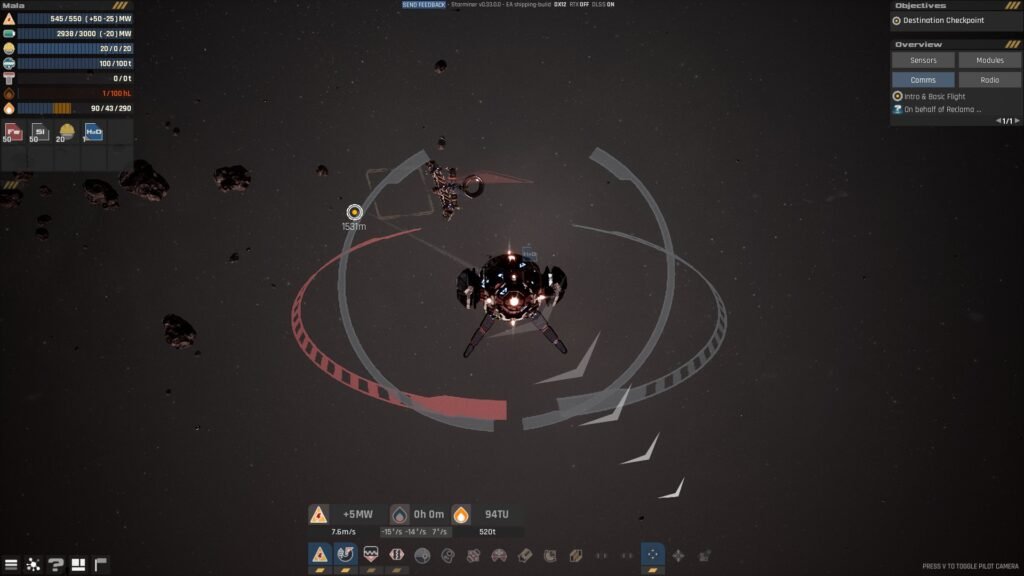
Starminer Movement Ship

There are 2 modes to set up the camera in Starminer: Pilot mode and Normal mode. Here’s how they operate, along with the differences between the two.

Pilot Mode

Pressing V on your keyboard will enter the pilot mode. Once in Pilot mode, hold the RMB to rotate your camera without moving the ship. Here you can use the scroll to zoom in and out.

Note: If you are in Pilot Mode, the bottom-right of the screen will have no information. If you are in normal mode, then you will see a text notifying you about activating pilot mode as an option.

Normal Mode

If you turn off the Pilot mode by pressing V on the keyboard, you enter the Normal mode. What happens here is that if you now press the RMB, you will be able to rotate your ship, but you will lose all the precision of the pilot mode.

I would advise switching to Pilot Mode whenever you want to angle the ship in the right direction. There are plenty of times you will see your ship upside down floating in space; it will be difficult to angle the ship at any destination if you are not aware of any sides of the ship.

Launching the Ship
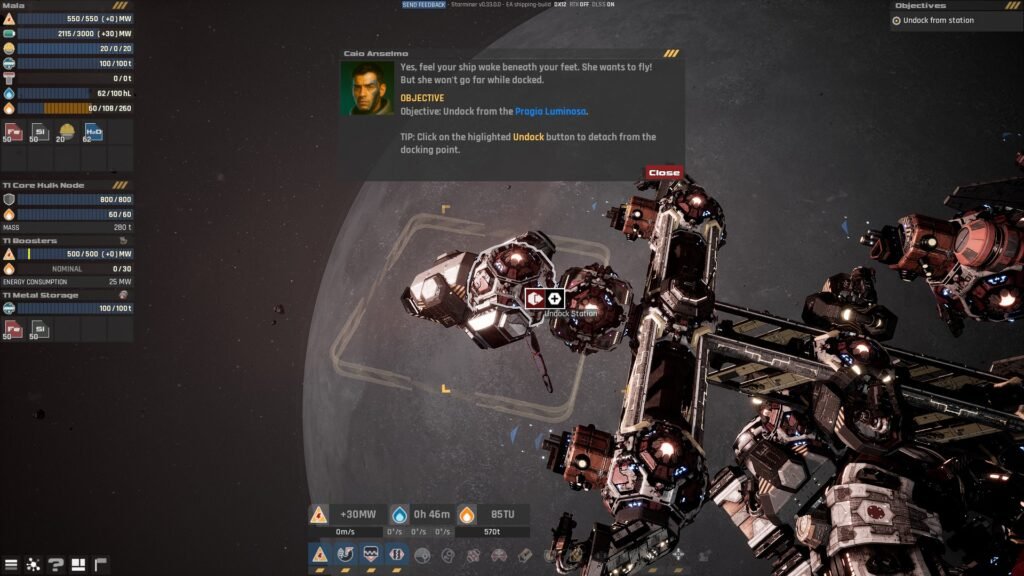
Starminer Dock and Undocking
  • Activate the Engine: Press G or click on the Energy Grid icon at the bottom of the HUD to activate the ship’s energy. It will power up the ship to move. Once the power is back up and running, it’s time to undock from the main ship.
  • Dock/ Undock: After activating the Energy Grid, you will get the option to Undock and Merge at the ship’s rear. Both Docking and Undocking have an icon of their own, marked with red. Click on the icon to release the ship from the main ship.

Ship’s Control Movement
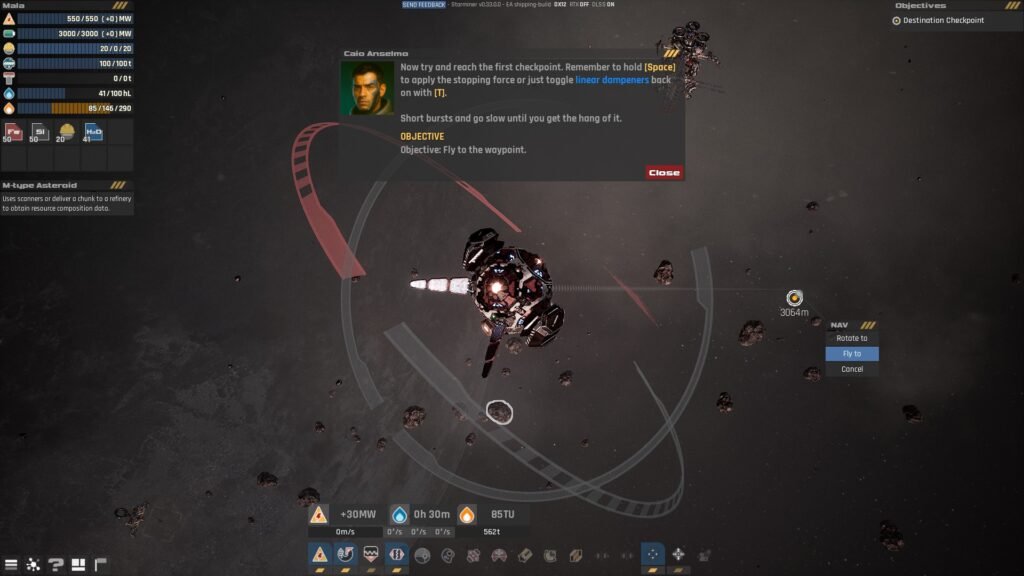
Starminer Ship Rotation

While camera control helps you set up the ship’s camera, moving the ship is a whole different ball game.

  • Directional Movement: Press W/S/A/D – The usual buttons you will press to move your ship forward, left, right, and back.
  • Up and Down Movement– Press Q to move up or ascend the ship upwards, and pressing E will help descend the ship downwards.

Proper Movement Control: About Linear Dampers

Pressing W will start the ship’s throttle, and it will soon start to move forward, but the second you stop pressing W, the ship will stop immediately. This is an act of Counter Force being applied by Linear Dampers, allowing for sharper control when the ship comes to a halt. Linear Dampers do consume energy; we have the option to turn them off.

But if you want to cruise with the ship, then you can turn off Counter Force by disabling Linear Dampers by pressing T. Now, when you stop the ship after moving a few meters, instead of stopping, it will keep going a few more meters. This will greatly help when trying to mine materials in Starminer.

I will advise that if you are floating in an open space, turn off the Linear Dampers, but if you are navigating between harsh areas, where movement matters, then turn the dampers back online.

Rotation

Pressing the directional keys (W/S/A/D) will move your ship in all four directions, but you will not be able to rotate your ship. Movement keys don’t rotate the ship. If the ship is looking north, it will be facing the same angle; only the position of the ship will change with the movement keys.

  • Ship Rotation: Press Shift + W/S/A/D to rotate the ship in all directions. You can also press Shift + Q/E to roll the ship either to the left or right for more control.

Proper Rotation Control: About Angular Dampers

Just like Linear Dampers, the ship also has Angular Dampers. The job of Angular Dampers is the same as that of Linear Dampers, but instead of influencing the movement of the ship, Angular Dampers focus on the rotation. You can enable Angular Dampers by pressing R on your keyboard, then rotate your ship by pressing Shift+W for proper precision control.

In short, when you let go of the rotate buttons (Shift + W/S/A/D), the ship will stay at the same location or spot where you stopped pressing the button. Disabling the Angular Dampers will allow the ship to still rotate after letting go of the rotate button (Shift + W/S/A/D).

Check the Ship’s Direction or Angle

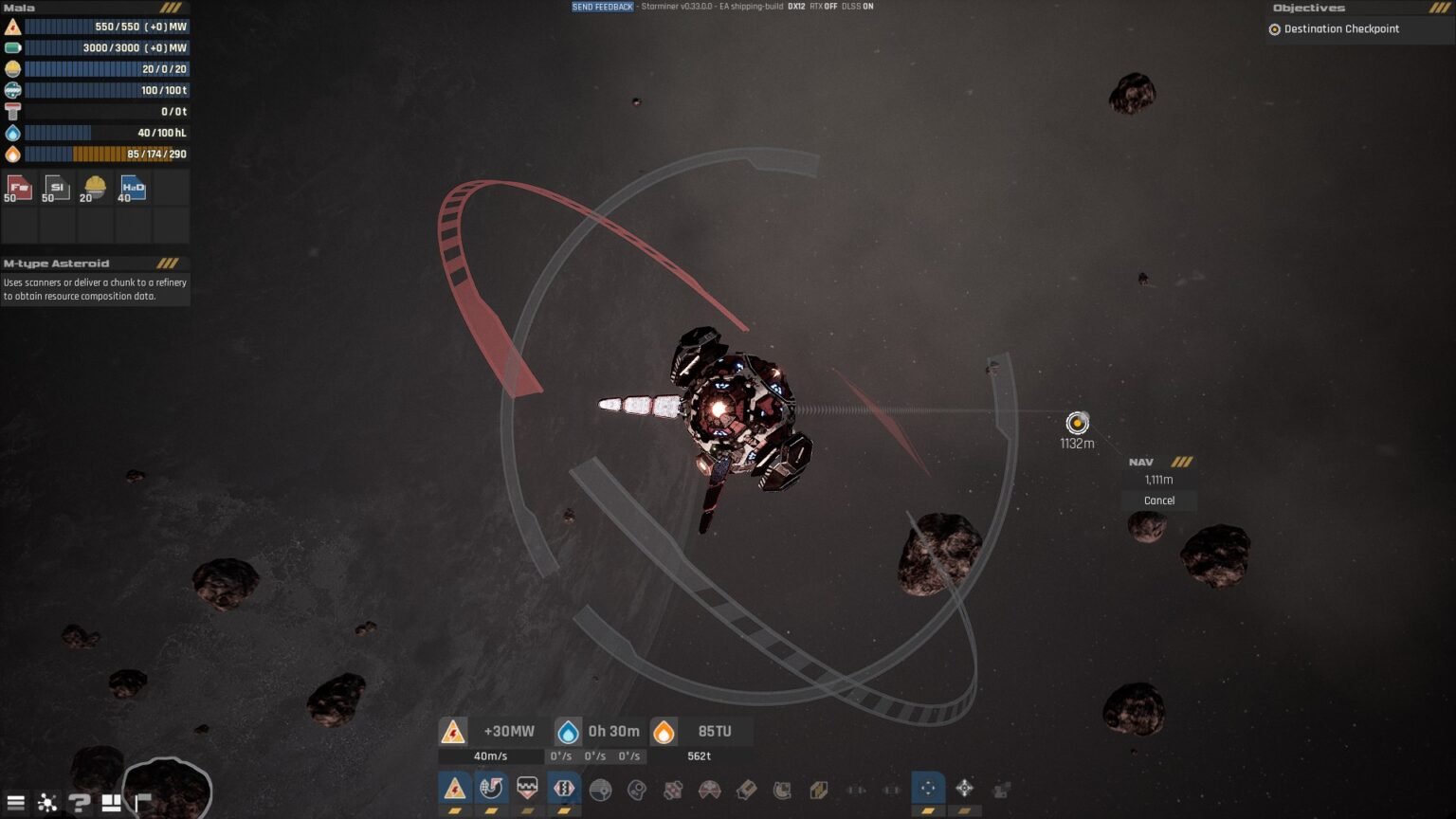
If you want to check the direction of the ship, where it’s facing, and where it is, the ship will start moving when you press the throttle key. Here, press N, and you will see a large circle around the ship with a red arrow. This function is called the Orientation Tool. The red arrow will indicate the front end of the ship. When you start the throttle, the ship will move in the direction of the red arrow. Use the N key to know the direction of the ship’s movement. It will also come in handy during the docking and undocking of the ship.

Auto Pilot Mode
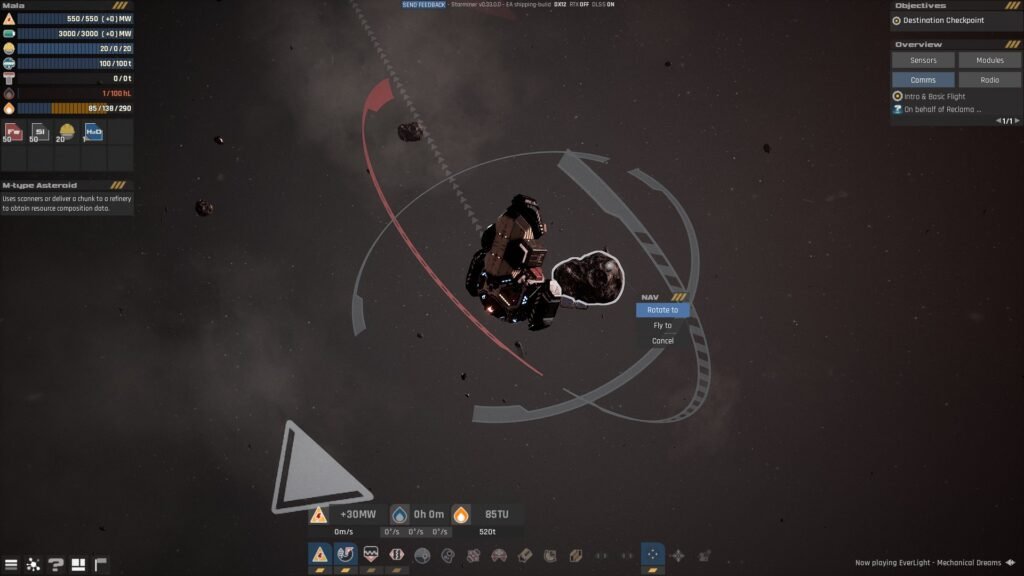
Starminer Destnatio on Astroid

Press V to pilot mode. Here, you will also unlock the option for autotravel or autopilot. Once in Pilot Mode. Pressing the left mouse button on any asteroid or desired location at a distance, you will get the option to

  • Rotate to: Angle your ship to the object
  • Fly to: Start the automatic travel process
  • Cancel: does nothing.

Note: While in Pilot Mode (Pressing V), you can press Right Mouse Click to rotate your ship without using Shift + W/S/A/D, as we do without the pilot mode.

When you are flying to a desired spot, I will highly recommend turning on the Linear Dampers, as they will help you stop at the destination when you arrive at the stop, instead of taking you further. While auto-travel stops your ship at the destination, but not entirely. Without Linear Dampers, your ship will always be moving a few meters from the destination without any input. So turn on Linear Dampers when you are setting the autodrive in Starminer.

Starminer
Share. Facebook Twitter Reddit WhatsApp
Santosh Kumar
  • LinkedIn

With 5 years of writing experience under his belt, Santosh's journey to game writing has helped many fight the big monsters, solve intricate puzzles, disarm the hidden traps, and finally open the treasure box.

LATEST POSTS

Gothic 1 Ancient Ore Armor and Improved Ore Armor Feature Image

Gothic 1 Remake- How to Get Improved Ore Armor

Gothic 1 Remake Gomez Room Chests Ancient Ore Armor

Gothic 1 Remake – How to get Ancient Ore Armor

Gothic 1 Remake A Letter form Mage Quest Featuer Image

Gothic 1 Remake – Give Letter to Torrez or Milton Choice Guide

Burglin Gnomes using Slingshot with player

Burglin’ Gnomes – How to craft & use the Slingshot

Gothic 1 Remake - How To Get Inside The Main Chamber (Orc Cemetery quest) - - News | | GamesHorizon

Gothic 1 Remake – How To Get Inside The Main Chamber (Orc Cemetery quest)

How to get the Everice Blade in Fatekeeper - - News | | GamesHorizon

How to get the Everice Blade in Fatekeeper

Meccha Chameleon featured image

How to play Meccha Chameleon on Mac

Outbound Materils List

Outbound – A Complete Guide to All Major Craftable Items (Location Details)

Outbound Dogs at Backyard

How to Get A Dog & Name It in Outbound

Starminer Trading Live between Ships

How to Trade Materials Between Ships in Starminer

FOLLOW US
  • Facebook
  • Twitter
  • Instagram
  • Pinterest

Subscribe to our Newsletter

Get the latest gaming news, guides and reviews from GamesHorizon to your INBOX!

MOST READ
15 Best Game Trilogies Of All Time, Ranked - - News | | GamesHorizon
15 Best Game Trilogies Of All Time, Ranked
RPG genre
The Best RPGs Of All Time – Updated For 2025
30 Best PS5 Games To Play In 2025 - - News | | GamesHorizon
30 Best PS5 Games To Play In 2025
40 Best PS4 Games You Shouldn't Miss (Ranked) - - News | | GamesHorizon
40 Best PS4 Games You Shouldn’t Miss (Ranked)
All rights reserved. Copyright © 2023 GamesHorizon.
  • About Us
  • Editorial Standards
  • Privacy Policy
  • Terms and Conditions
  • Contact Us

Type above and press Enter to search. Press Esc to cancel.

GamesHorizon
Powered by  GDPR Cookie Compliance
Privacy Overview

This website uses cookies so that we can provide you with the best user experience possible. Cookie information is stored in your browser and performs functions such as recognising you when you return to our website and helping our team to understand which sections of the website you find most interesting and useful.

Strictly Necessary Cookies

Strictly Necessary Cookie should be enabled at all times so that we can save your preferences for cookie settings.

Analytics

This website uses Google Analytics to collect anonymous information such as the number of visitors to the site, and the most popular pages.

Keeping this cookie enabled helps us to improve our website.