
Close Menu
GamesHorizonGamesHorizon
  • News
  • Guides
  • Reviews
  • Features
  • Platforms
    • PC
    • PS5
    • Xbox Series S
    • Nintendo
    • PS4
    • Xbox One
  • Anime
  • Game Hubs

Subscribe to our Newsletter

Get the latest gaming news, guides and reviews from GamesHorizon to your INBOX!

WHAT'S HOT
The Adventures of Elliot Three Sages Picture Cat

The Adventures of Elliot – All 50 Cat Locations

June 23, 2026
The Adventures of Elliot - Wonderful Friends Side Quest Guide - - Guides | dock ship in starfield | GamesHorizon

The Adventures of Elliot – Wonderful Friends Side Quest Guide

June 21, 2026
The Adventures of Elliot Side Quest Feature Image

The Adventures of Elliot: All Side Quest Locations

June 21, 2026
Facebook X (Twitter) Instagram Pinterest
  • Starfield
  • REPLACED
  • Alabaster Dawn
  • Outbound
GamesHorizonGamesHorizon
  • News
    Aceles or Mircobe in Starfield

    Starfield’s performance on PS5 leads to players demanding refunds

    April 13, 2026
    A Rockband poster with someone playing a guitar in front of others playing instruments

    Rock Band 4 Is Getting Delisted This Month

    October 1, 2025
    Xbox Series X and Series S placed together on a table.

    Microsoft’s Website Crashes as Gamers Boycott Xbox Pay Everywhere Over 50% Price Hike

    October 1, 2025
    Ubisoft’s New ‘Vantage Studios’ Gives Its Franchises to the Guy Whose Last Gig Was an Anime Avatar AI/NFT Startup - - Guides | dock ship in starfield | GamesHorizon

    Ubisoft’s New ‘Vantage Studios’ Gives Its Franchises to the Guy Whose Last Gig Was an Anime Avatar AI/NFT Startup

    October 1, 2025
    Fortnite Peacemaker doing a nazi symbol

    Fortnite Removed an Emote for Racist Origins

    September 29, 2025
  • Guides
    The Adventures of Elliot Three Sages Picture Cat

    The Adventures of Elliot – All 50 Cat Locations

    June 23, 2026
    The Adventures of Elliot - Wonderful Friends Side Quest Guide - - Guides | dock ship in starfield | GamesHorizon

    The Adventures of Elliot – Wonderful Friends Side Quest Guide

    June 21, 2026
    The Adventures of Elliot Side Quest Feature Image

    The Adventures of Elliot: All Side Quest Locations

    June 21, 2026
    The Adventures of Elliot Feature Image

    The Adventures of Elliot: All Fairy Power Locations

    June 20, 2026
    The Adventures of Elliot Hidden Boss Demise the Destroyer Feature Image

    The Adventures of Elliot – How to Get All Endings

    June 19, 2026
  • Reviews
  • Features
    Starfield Feature Image

    Everything Added to Starfield since Launch

    April 7, 2026
    An overview of the scenery in Dying Light The Beast

    Where Does Dying Light The Beast Take Place?

    September 15, 2025
    First-person combat showcased in Borderlands 4, highlighting its vibrant weapon designs and firefights.

    Borderlands 4 Needs to Have These Features From Borderlands 3

    September 10, 2025
    A screenshot from the games Ender Lilies: Quietus of the Knights, Bō: Path of the Teal Lotus, and Hollow Knight

    Best Games Like Hollow Knight Silksong

    September 9, 2025
    Remi disguised as a townsperson and standing in the woods

    Hell Is Us First Impressions

    August 25, 2025
  • Platforms
    • PC
    • PS5
    • Xbox Series S
    • Nintendo
    • PS4
    • Xbox One
  • Anime
    Smiling Statue In Solo Leveling, Explained and Answered

    Solo Leveling Statue Smile Explained: The Cruel Creator, System Blueprints, and Season 3 Secrets

    May 26, 2026
    All About Baruka In Solo Leveling

    All About Baruka In Solo Leveling

    March 21, 2024
    9 Strongest Mashle Characters, Ranked

    9 Strongest Mashle Characters, Ranked

    March 21, 2024
    Mashle Season 2 Episode 11 Release Date Details

    Mashle Season 2 Episode 11 Release Date, Time, And Where To Watch

    March 20, 2024
    Solo Leveling Episode 11 Expectations

    Solo Leveling Episode 11: Release Date, Time, And Where To Watch

    March 20, 2024
  • Game Hubs
GamesHorizonGamesHorizon
Home»Guides
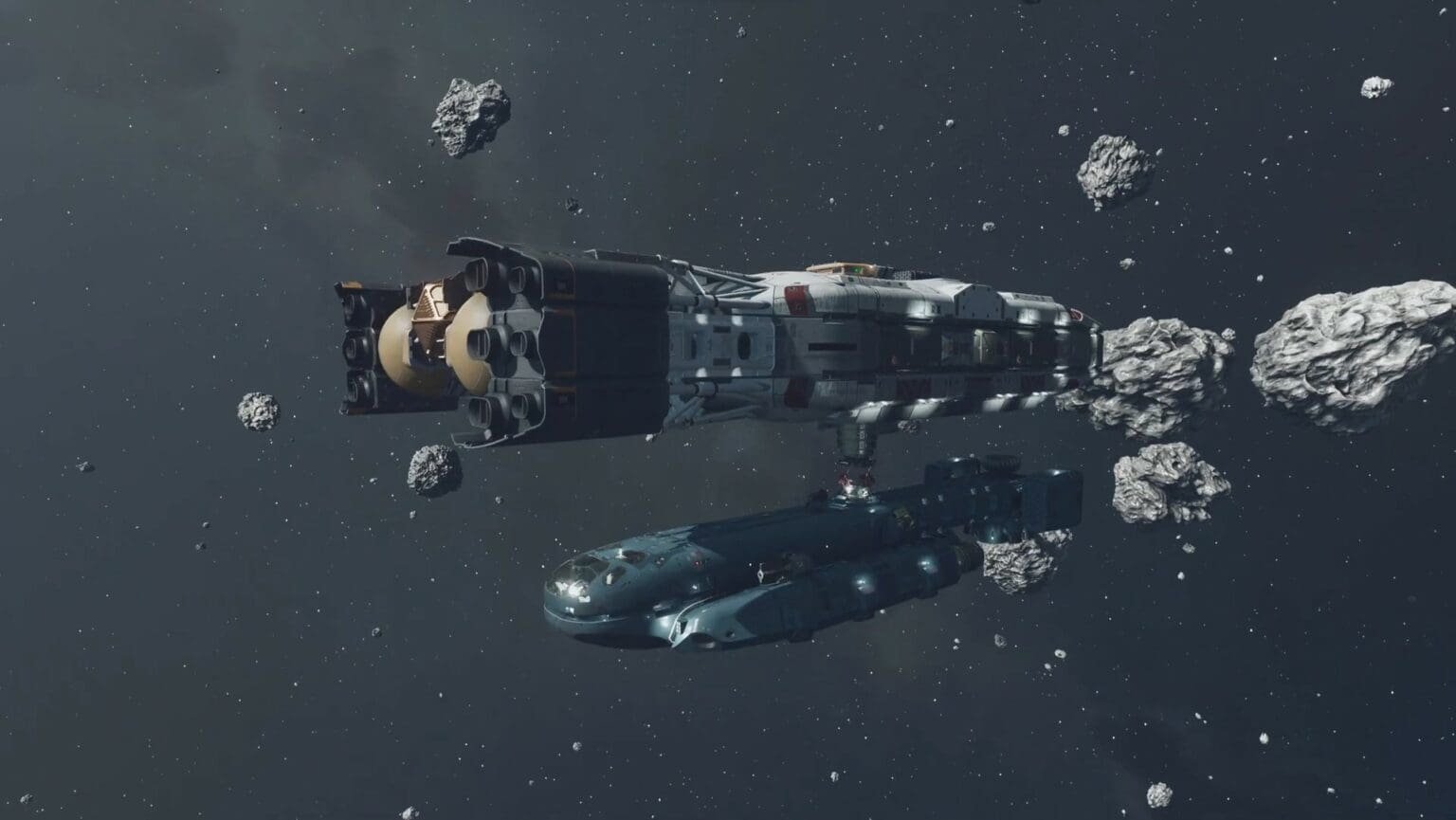
A ship docking with another in Starfield
A ship docking with another in Starfield (Image via Bethesda)

How To Dock Ship In Starfield Explained

Amar DeogaonkarBy Amar DeogaonkarUpdated:April 19, 20265 Mins Read Guides April 10, 2026
SHARE
Facebook Twitter Reddit WhatsApp Telegram Tumblr

In Starfield, you will most likely spend a lot of time on your spaceship. There are two distinct ways to deboard your ship in the game. On planets, you will have to land your ship and deboard. This is relatively easy, as you simply have to pick a spot to land on the planet you have selected, and the ship lands itself. In space, however, things are a little different. In order to enter a space station or another ship in space, you will have to dock your ship.

Step-by-Step Guide To Docking a Ship in Starfield
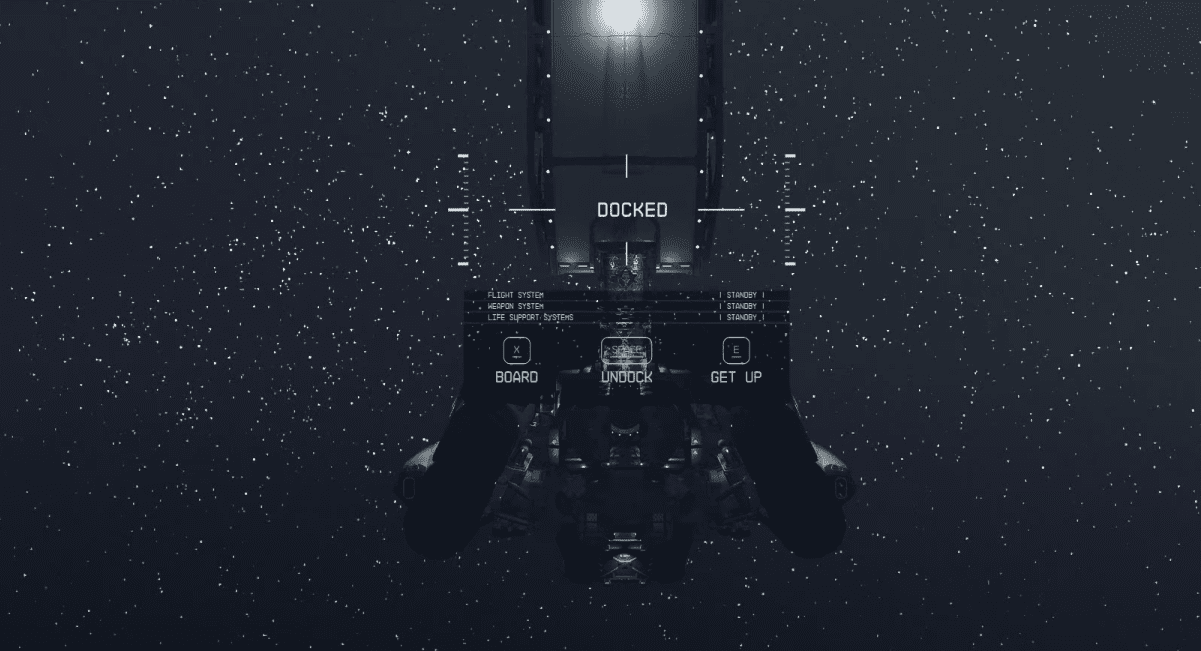
Options seen after ship has been docked in Starfield
Options seen after the ship has been docked in Starfield (Image via Bethesda)

In order to enter space stations, such as the Nova Galactic Staryard space station in the second main story mission of Starfield, The Old Neighborhood, you will have to manually dock your ship. You can follow this step-by-step guide to dock your ship in any space station or an ally’s ship:

  1. Once you have eyes on the space station you want to dock in, target the station by pressing the A button.
  2. Holding down the A button on the Xbox controller (E button on PC) will give you an option to hail your target. Doing so will open a communication channel with the target.
  3. In order to dock, ensure that you are less than 500m away from your target.
  4. Once you are within the right distance, you will see a prompt that indicates the docking option is available.
  5. When you see the prompt, hold down the X button on the Xbox controller (R button on PC) to begin the docking procedure.
  6. The ship will dock itself, and you will find yourself back in the pilot’s seat.

After you have successfully docked, you will get three options to proceed.

  1. Board the space station or ship you have docked with (using the X button on Xbox as well as PC)
  2. Undock from the space station or ship (by holding down the Y button on Xbox or Spacebar on PC) and begin your journey
  3. Leave the pilot’s seat and roam around your ship (using the B button on Xbox or the E button on PC)

Note: If you have some things in your ship to take care of before you board the space station or ship, you can choose the third option. After finishing your work in the spaceship, you can travel to your ship’s airlock, open it to find the door to the other vessel, and board the space station or ship you have docked with.

How to Dock an Enemy Ship?

Docking an enemy ship follows the same procedure as a common stationary ship or orbital station, but with a bit of a twist. If you are planning to board an enemy ship, you must disable its engines, which can be done by getting the Targeting Control System Skill (Novice Tech Skill).

Bring down the enemy ship’s shield, then aim for the engine. Once the engines are destroyed, you can board the enemy ship. You must get close to 500 meters from the enemy ship to get the boarding prompt. One of the common mistakes anyone can make here is to completely destroy the enemy ship, just focus on the engines, and prioritize them in the list of things to blow up. Once they are blown up, you can board by following the traditional way.

Starfield brings incredible visuals to a sprawling narrative.

Also Read:

Starfield Guides Hub

Free Lane Update – How to Access Cruise Mode

Starfield Free Lance DLC Update 2026

In the old method, we had to click on the planet in a solar system and then use the travel to head to the place. Now, with the Free Lane Cruise Mode update, we can use the Cruise Mode to travel to any planet within the solar system without selecting it from the system map. In short, Cruise Mode will allow you to fly between planets but only within a solar system.

You can press L1 (PS)/ LB (Xbox)/ hold T (PC) in the cockpit to activate the Cruise Mode. To add speed to the mode, you can do it by pressing L3 or LS.

Note: The Cruise Mode unlocks after you depart from New Atlantis. And no, you can’t use Cruise Mode to travel between Vectera and Kreet.

What Can’t You do With Cruise Mode?

You can’t use the Cruise Mode to leave a solar system for another; the rule only applies between planets.

If you want to travel to another solar system, then you need to travel to the system using Grav Drive, and then you can enjoy the Cruise Mode. For example, let’s assume you are in the SOL solar system. Here, you can use Cruise Mode to travel anywhere in the SOL system, but if you want to head to a different solar system, let’s say, Alpha Centauri, then you must use the Grav Jump.

When you want to fast travel to another location using Grav Jump, you will have to get back into your ship, get in the pilot’s seat, and choose the undock option. After you have successfully undocked and are back in space, controlling your ship, you can manually travel through space or open the star map to select a location for fast travel.

Starfield
Share. Facebook Twitter Reddit WhatsApp
Avatar photo
Amar Deogaonkar
  • X (Twitter)
  • LinkedIn

Amar is a Video Game Journalist at GamesHorizon, covering the latest game launches and crucial industry scoops. He has been writing for more than a decade and gaming ever since the original Contra games were cool. A sucker for slasher RPGs with minimal skill-tree elements and hours-long cutscenes.

LATEST POSTS

The Adventures of Elliot Three Sages Picture Cat

The Adventures of Elliot – All 50 Cat Locations

The Adventures of Elliot - Wonderful Friends Side Quest Guide - - Guides | dock ship in starfield | GamesHorizon

The Adventures of Elliot – Wonderful Friends Side Quest Guide

The Adventures of Elliot Side Quest Feature Image

The Adventures of Elliot: All Side Quest Locations

The Adventures of Elliot Feature Image

The Adventures of Elliot: All Fairy Power Locations

The Adventures of Elliot Hidden Boss Demise the Destroyer Feature Image

The Adventures of Elliot – How to Get All Endings

The Adventures of Elliot Weapons Full Feature Image

The Adventures of Elliot – All Weapon Locations & Upgrades

The Adventures of Elliot Diving Manual Item

The Adventures of Elliot – How to Dive Underwater

Gothic 1 Ancient Ore Armor and Improved Ore Armor Feature Image

Gothic 1 Remake- How to Get Improved Ore Armor

Gothic 1 Remake Gomez Room Chests Ancient Ore Armor

Gothic 1 Remake – How to get Ancient Ore Armor

Gothic 1 Remake A Letter form Mage Quest Featuer Image

Gothic 1 Remake – Give Letter to Torrez or Milton Choice Guide

FOLLOW US
  • Facebook
  • Twitter
  • Instagram
  • Pinterest

Subscribe to our Newsletter

Get the latest gaming news, guides and reviews from GamesHorizon to your INBOX!

MOST READ
15 Best Game Trilogies Of All Time, Ranked - - Guides | dock ship in starfield | GamesHorizon
15 Best Game Trilogies Of All Time, Ranked
RPG genre
The Best RPGs Of All Time – Updated For 2025
30 Best PS5 Games To Play In 2025 - - Guides | dock ship in starfield | GamesHorizon
30 Best PS5 Games To Play In 2025
40 Best PS4 Games You Shouldn't Miss (Ranked) - - Guides | dock ship in starfield | GamesHorizon
40 Best PS4 Games You Shouldn’t Miss (Ranked)
All rights reserved. Copyright © 2023 GamesHorizon.
  • About Us
  • Editorial Standards
  • Privacy Policy
  • Terms and Conditions
  • Contact Us

Type above and press Enter to search. Press Esc to cancel.

GamesHorizon
Powered by  GDPR Cookie Compliance
Privacy Overview

This website uses cookies so that we can provide you with the best user experience possible. Cookie information is stored in your browser and performs functions such as recognising you when you return to our website and helping our team to understand which sections of the website you find most interesting and useful.

Strictly Necessary Cookies

Strictly Necessary Cookie should be enabled at all times so that we can save your preferences for cookie settings.

Analytics

This website uses Google Analytics to collect anonymous information such as the number of visitors to the site, and the most popular pages.

Keeping this cookie enabled helps us to improve our website.