
Close Menu
GamesHorizonGamesHorizon
  • News
  • Guides
  • Reviews
  • Features
  • Platforms
    • PC
    • PS5
    • Xbox Series S
    • Nintendo
    • PS4
    • Xbox One
  • Anime
  • Game Hubs

Subscribe to our Newsletter

Get the latest gaming news, guides and reviews from GamesHorizon to your INBOX!

WHAT'S HOT
Half Sword Patch Update Feature Image

Half Sword – All Changes in Patch 0.6.1

June 24, 2026
Crimson Desert New Patch Armor Feature Image

Crimson Desert: All New Armor Sets & Helm Locations in Patch 1.12

June 24, 2026
The Adventures of Elliot Guide Hub Feature image

The Adventures of Elliot Guide Hub

June 24, 2026
Facebook X (Twitter) Instagram Pinterest
  • Starfield
  • REPLACED
  • Alabaster Dawn
  • Outbound
  • The Adventures of Elliot
GamesHorizonGamesHorizon
  • News
    Aceles or Mircobe in Starfield

    Starfield’s performance on PS5 leads to players demanding refunds

    April 13, 2026
    A Rockband poster with someone playing a guitar in front of others playing instruments

    Rock Band 4 Is Getting Delisted This Month

    October 1, 2025
    Xbox Series X and Series S placed together on a table.

    Microsoft’s Website Crashes as Gamers Boycott Xbox Pay Everywhere Over 50% Price Hike

    October 1, 2025
    Ubisoft’s New ‘Vantage Studios’ Gives Its Franchises to the Guy Whose Last Gig Was an Anime Avatar AI/NFT Startup - - News | | GamesHorizon

    Ubisoft’s New ‘Vantage Studios’ Gives Its Franchises to the Guy Whose Last Gig Was an Anime Avatar AI/NFT Startup

    October 1, 2025
    Fortnite Peacemaker doing a nazi symbol

    Fortnite Removed an Emote for Racist Origins

    September 29, 2025
  • Guides
    Half Sword Patch Update Feature Image

    Half Sword – All Changes in Patch 0.6.1

    June 24, 2026
    Crimson Desert New Patch Armor Feature Image

    Crimson Desert: All New Armor Sets & Helm Locations in Patch 1.12

    June 24, 2026
    The Adventures of Elliot Three Sages Picture Cat

    The Adventures of Elliot – All 50 Cat Locations

    June 23, 2026
    The Adventures of Elliot - Wonderful Friends Side Quest Guide - - News | | GamesHorizon

    The Adventures of Elliot – Wonderful Friends Side Quest Guide

    June 21, 2026
    The Adventures of Elliot Side Quest Feature Image

    The Adventures of Elliot: All Side Quest Locations

    June 21, 2026
  • Reviews
  • Features
    Starfield Feature Image

    Everything Added to Starfield since Launch

    April 7, 2026
    An overview of the scenery in Dying Light The Beast

    Where Does Dying Light The Beast Take Place?

    September 15, 2025
    First-person combat showcased in Borderlands 4, highlighting its vibrant weapon designs and firefights.

    Borderlands 4 Needs to Have These Features From Borderlands 3

    September 10, 2025
    A screenshot from the games Ender Lilies: Quietus of the Knights, Bō: Path of the Teal Lotus, and Hollow Knight

    Best Games Like Hollow Knight Silksong

    September 9, 2025
    Remi disguised as a townsperson and standing in the woods

    Hell Is Us First Impressions

    August 25, 2025
  • Platforms
    • PC
    • PS5
    • Xbox Series S
    • Nintendo
    • PS4
    • Xbox One
  • Anime
    Smiling Statue In Solo Leveling, Explained and Answered

    Solo Leveling Statue Smile Explained: The Cruel Creator, System Blueprints, and Season 3 Secrets

    May 26, 2026
    All About Baruka In Solo Leveling

    All About Baruka In Solo Leveling

    March 21, 2024
    9 Strongest Mashle Characters, Ranked

    9 Strongest Mashle Characters, Ranked

    March 21, 2024
    Mashle Season 2 Episode 11 Release Date Details

    Mashle Season 2 Episode 11 Release Date, Time, And Where To Watch

    March 20, 2024
    Solo Leveling Episode 11 Expectations

    Solo Leveling Episode 11: Release Date, Time, And Where To Watch

    March 20, 2024
  • Game Hubs
GamesHorizonGamesHorizon
Home»Guides
Nightingale Error getting Shards For Client
(Image via GamesHorizon)

How To Fix Nightingale “Error Getting Shards For Client”

Amar DeogaonkarBy Amar Deogaonkar4 Mins Read Guides February 21, 2024
SHARE
Facebook Twitter Reddit WhatsApp Telegram Tumblr

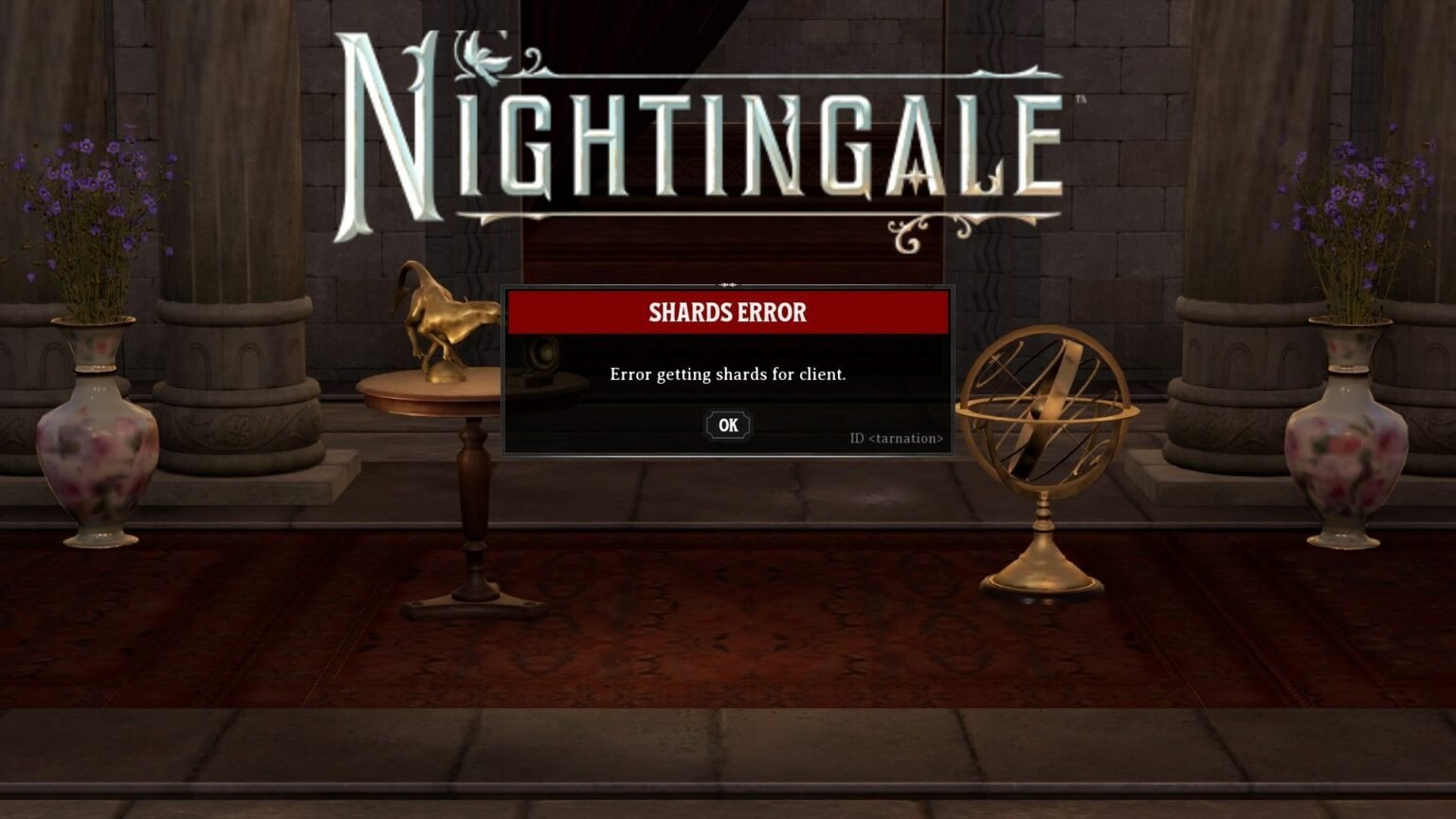
Players have been facing the Nightingale shards error recently, and it’s truly confusing. On the surface, it sounds like some in-game problem, but the real issue is completely different. Let’s decode this mysterious error message.

Table of Contents

  1. How To Fix Nightingale Error Getting Shards For Client
    1. Ensure That Nightingale Servers Are Running
    2. Check Your Internet Connection
    3. Restart Your Router
    4. Relaunch The Game
    5. Reinstall The Game
      1. How To Reinstall Nightingale on Steam:
      2. How To Reinstall Nightingale on Epic Games Launcher

How To Fix Nightingale Error Getting Shards For Client

Nightingale ‘Error Getting Shards for Client’ indicates that your computer has failed to connect to the game’s servers. This isn’t an in-game error, rather a creative way for developers to tell you that there is a problem connecting with game’s servers.

Nightingale is a online-only game. So even if you are playing this game on a solo mode, you will need to connect to internet while playing this game.

There are a few ways to fix Nightingale “Error Getting Shards for Client”:

Ensure That Nightingale Servers Are Running

Nightingale is currently in early access mode. So, it is natural that developer must be getting loads of bug reports. When trying to fix a major bug, there is a high chance that the game might be undergoing some kind of server maintenance.

If that is the case, Inflexion Games will announce it through their official X channel or website. Try checking these avenues to see if there is indeed a server maintenance going on. If there is, all you can do is wait. Developers typically inform the players when server maintenance starts and when the servers are back online again.

Check Your Internet Connection

Poor internet speed or unstable connection might be causing this problem. Run a simple speed test to check that your internet speed is high and stable. If you have a high ping count or your speed has fallen, you might need to contact your internet service provider.

Restart Your Router

Restarting your router is internet connectivity problem solving 101. Try switching off the power supply to your router, wait for a couple of minutes, and turn the power back on. Once the router is active (which might take a couple of minutes after you restart it), check your internet speed and try restarting the game.

Relaunch The Game

If your internet connection is tip-top and Inflexion hasn’t announced any server issues, try rebooting the game. I recommended rebooting your PC and then relaunching the game. As Nightingale is currently in early access mode, there might be some temporary bugs present that could be causing this error. Restarting your computer, launching Steam or Epic Games Store and relaunching the game might just do the trick.

Reinstall The Game

If none of the aforementioned methods work and the issue persists, I recommend reinstalling the game. Do not worry, reinstalling the game will not erase your saved data. So even after reinstalling, you should be able to pick up from where you left off.

How To Reinstall Nightingale on Steam:

  1. Open your Steam Games Library.
  2. Locate and right-click on Nightingale Icon.
  3. Select Manage from the drop-down menu.
  4. Click Uninstall in the Manage tab.
  5. Relaunch Steam.
  6. You will still see Nightingale Icon in your library, now with a blue button next to it.
  7. Hit this blue Install button to reinstall the game.

How To Reinstall Nightingale on Epic Games Launcher

  1. Open Games Library in Epic Games Launcher.
  2. Locate Nightingale.
  3. Click three dots next to the game’s icon.
  4. Click Uninstall from the drop-down menu.
  5. Restart the launcher.
  6. Locate the Nightingale Icon and select Install from the same drop-down menu (by clicking on three dots next to the icon).
Nightingale
Share. Facebook Twitter Reddit WhatsApp
Avatar photo
Amar Deogaonkar
  • X (Twitter)
  • LinkedIn

Amar is a Video Game Journalist at GamesHorizon, covering the latest game launches and crucial industry scoops. He has been writing for more than a decade and gaming ever since the original Contra games were cool. A sucker for slasher RPGs with minimal skill-tree elements and hours-long cutscenes.

LATEST POSTS

Half Sword Patch Update Feature Image

Half Sword – All Changes in Patch 0.6.1

Crimson Desert New Patch Armor Feature Image

Crimson Desert: All New Armor Sets & Helm Locations in Patch 1.12

The Adventures of Elliot Guide Hub Feature image

The Adventures of Elliot Guide Hub

The Adventures of Elliot Three Sages Picture Cat

The Adventures of Elliot – All 50 Cat Locations

The Adventures of Elliot - Wonderful Friends Side Quest Guide - - News | | GamesHorizon

The Adventures of Elliot – Wonderful Friends Side Quest Guide

The Adventures of Elliot Side Quest Feature Image

The Adventures of Elliot: All Side Quest Locations

The Adventures of Elliot Feature Image

The Adventures of Elliot: All Fairy Power Locations

The Adventures of Elliot Hidden Boss Demise the Destroyer Feature Image

The Adventures of Elliot – How to Get All Endings

The Adventures of Elliot Weapons Full Feature Image

The Adventures of Elliot – All Weapon Locations & Upgrades

The Adventures of Elliot Diving Manual Item

The Adventures of Elliot – How to Dive Underwater

FOLLOW US
  • Facebook
  • Twitter
  • Instagram
  • Pinterest

Subscribe to our Newsletter

Get the latest gaming news, guides and reviews from GamesHorizon to your INBOX!

MOST READ
15 Best Game Trilogies Of All Time, Ranked - - News | | GamesHorizon
15 Best Game Trilogies Of All Time, Ranked
RPG genre
The Best RPGs Of All Time – Updated For 2025
30 Best PS5 Games To Play In 2025 - - News | | GamesHorizon
30 Best PS5 Games To Play In 2025
40 Best PS4 Games You Shouldn't Miss (Ranked) - - News | | GamesHorizon
40 Best PS4 Games You Shouldn’t Miss (Ranked)
All rights reserved. Copyright © 2023 GamesHorizon.
  • About Us
  • Editorial Standards
  • Privacy Policy
  • Terms and Conditions
  • Contact Us

Type above and press Enter to search. Press Esc to cancel.

GamesHorizon
Powered by  GDPR Cookie Compliance
Privacy Overview

This website uses cookies so that we can provide you with the best user experience possible. Cookie information is stored in your browser and performs functions such as recognising you when you return to our website and helping our team to understand which sections of the website you find most interesting and useful.

Strictly Necessary Cookies

Strictly Necessary Cookie should be enabled at all times so that we can save your preferences for cookie settings.

Analytics

This website uses Google Analytics to collect anonymous information such as the number of visitors to the site, and the most popular pages.

Keeping this cookie enabled helps us to improve our website.